AI in the ClassCAD Environment

CAD for agents, with the user in the loop
In August we described four AI projects around ClassCAD. Two months later the picture has changed enough to write it again. The pieces now live in one open-source monorepo, classcad-ai, as five npm packages:
@classcad/skill— the verified knowledge of the API@classcad/script— the medium: an agent writes a program, not one call per turn@classcad/renderer— the proof: deterministic views, sections and technical drawings@classcad/mcp— the MCP server for coding agents, now self-contained, with its own engine@buerli.io/ai— the in-app assistant for end users
And the part we are most pleased with: every MCP session comes with a live CAD app. Buerligons docks into the agent's session, so the user turns, selects and edits the same model the agent is building, and a share link lets a colleague do the same from another machine.
👉 https://github.com/awv-informatik/classcad-ai · 👉 https://classcad.ai
What is ClassCAD?
ClassCAD is a headless, programmable CAD engine developed by AWV Informatik AG. It has no user interface and no interactive modeling of its own — it is CAD as a backend / service, designed to be embedded into native, web, cloud and automated applications.
Technically it is a parametric, feature-based solid modeling kernel. The core is C++ — a compiler and the ClassCAD virtual machine (CCVM) — driven by an object-oriented CAD scripting language that holds the system classes and the application logic, with the geometry kernel from SMLib/Nvidia and 2D/3D constraint solvers from Bricsys/Hexagon (LGS). The same engine runs as a server (classcad-cli worker) and cross-compiles to WebAssembly, so it runs in a browser page, or in a Node.js process.
Clients talk to it exclusively through a versioned JSON/WebSocket/HTTP API following the pattern api.v1.<domain>.<method>(params). There are currently 264 methods across 7 domains: part, assembly, sketch, curve, solid, drawing2d and common. Official API wrappers exist for JavaScript, Python and .NET.
buerli is the web SDK and UI layer built on top of ClassCAD: the @buerli.io/* packages wrap the engine for React / react-three-fiber, and Buerligons is the open, interactive CAD modeler that this ecosystem powers.
How AI fits into ClassCAD
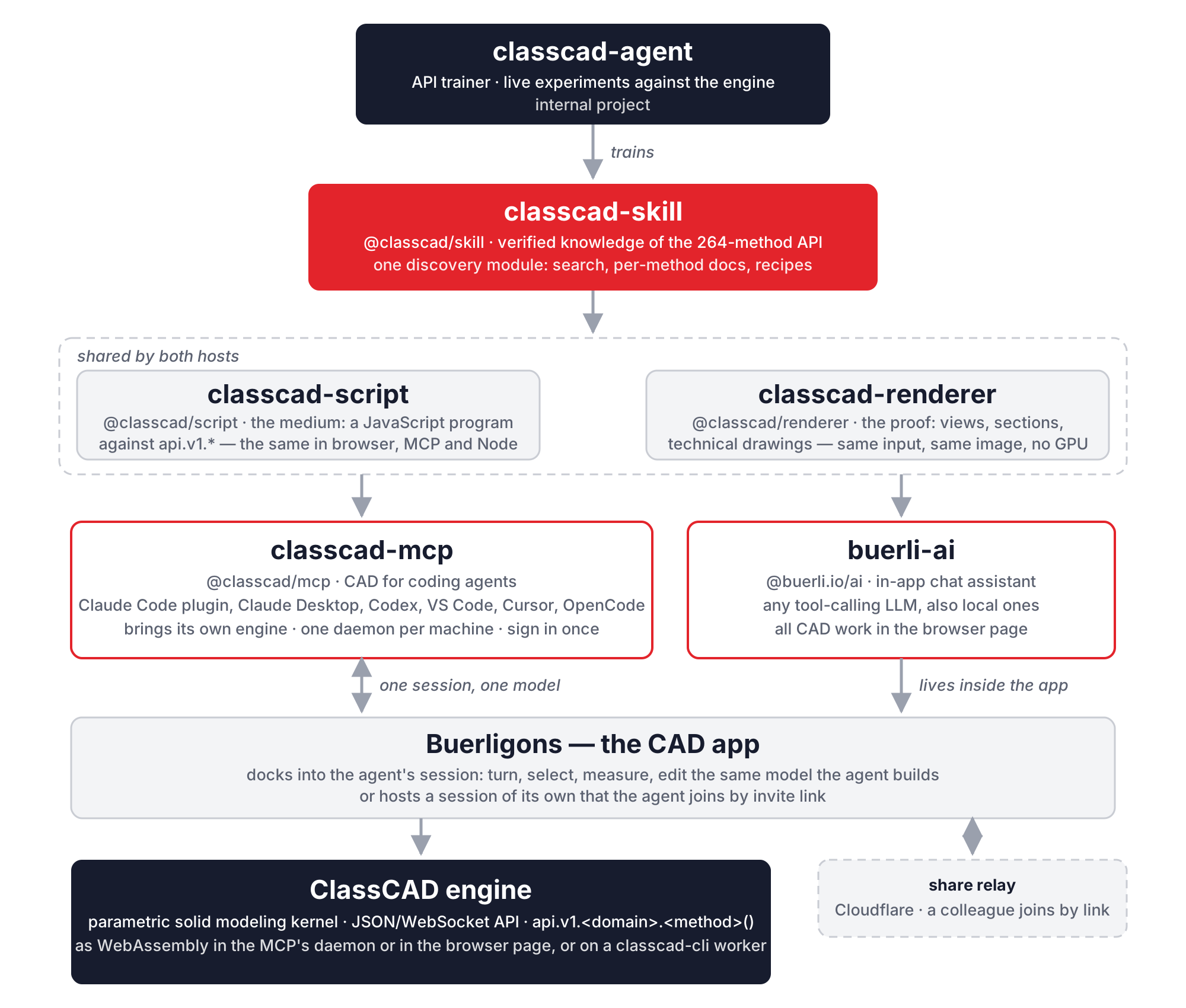
Because everything in ClassCAD goes through one well-defined v1.<domain>.<method> API, it is an ideal surface for LLMs to drive — if the model knows the API precisely, if it can express a construction as a program rather than as a conversation, and if it can prove what it built. Three packages answer those three ifs, and two hosts put them in front of people:
- classcad-skill is the shared, verified knowledge base of the API. classcad-agent, our internal trainer, produces it by experimenting against a live engine.
- classcad-script is the execution medium: model-written JavaScript against the API, identical in the browser, in the MCP and in headless Node.
- classcad-renderer turns session data into images an agent can check: fixed views, hidden lines, sections, before/after diffs.
- classcad-mcp exposes all of it to coding agents (Claude Code, Codex, VS Code Copilot, Cursor, OpenCode) over MCP, with Buerligons docked into every session.
- buerli-ai embeds the same capability as a chat assistant inside the application.
The knowledge: classcad-skill and classcad-agent
👉 https://github.com/awv-informatik/classcad-ai/tree/master/packages/skill
@classcad/skill is an Agent Skill — a SKILL.md manifest plus a structured library of Markdown references that teach any LLM how to generate correct ClassCAD code. Every per-method document is battle-tested: the described behavior was observed by running real API calls against a live engine, including the failure modes, silent no-ops and discrepancies that source documentation does not cover.
It holds three tiers:
- Source API docs — the ground-truth signatures for all 264 methods.
- Per-method LLM docs — prerequisites, exact parameters, return shapes, gotchas and silent failures, error tables and runnable examples.
- Recipes — end-to-end guides for the workflows that span domains: constrained sketching, parametric parts, pattern-then-subtract, direct modeling, assembly parameters, and
verification, which every build is expected to read.
New since August is the discovery module. @classcad/skill/discovery is one implementation of everything an agent host needs to serve this knowledge: a BM25 search over the method index that knows CAD synonyms (a hole is a bore, a round is a fillet), a fuzzy describeMethod that resolves bare names and suggests fixes for typos, the compact method index a host puts into its system prompt, and the bulk docs tool that returns many documents in one call. The MCP server and the in-app assistant register their discovery tools from this module — same code, same behavior.
classcad-agent remains the internal project that produces the skill. It is an autonomous agent inside a local-first orchestration platform; scheduled sessions pick the next task from an ordered learning plan, run focused test scripts against a real engine, back every spatial claim with numbers (vertex coordinates, bounding boxes, mass properties), and distill the findings into the skill. A human reviews between runs.
The medium: classcad-script
👉 https://github.com/awv-informatik/classcad-ai/tree/master/packages/script
CAD construction is mostly computation. An agent that dictates one API call per model turn spends its context on bookkeeping; an agent that writes a program — variables, Math, loops, geometry filtering — builds a flange in one go. @classcad/script is that medium. A script runs as an async function body against a session-abstracted api object:
const partId = (await api.v1.part.create({ name: 'Demo' })).result
await api.v1.part.cylinder({ id: partId, diameter: 40, height: 20 })
const g = await api.graphic()          // real geometry: containers, meshes, edges
const tree = await api.tree()          // the structure tree: parts, features, sketches
const mass = await api.v1.part.calculateMassProperties({ id: partId })
return { partId, volume: mass.result.volume }
The guaranteed surface — api.v1.*, api.tree(), api.graphic() — exists in every environment, so a script runs unchanged in a buerli browser app, in the MCP and in a headless Node harness or CI. With the method registry from the skill, api.v1 is typo-safe: an unknown name throws immediately with suggestions instead of failing downstream. State persists between scripts, so a follow-up script attaches to the existing model. The script an agent used to build a part is also the deliverable for a configurable part: it runs in the customer's own ClassCAD app, where the parameters can be changed live.
The proof: classcad-renderer
👉 https://github.com/awv-informatik/classcad-ai/tree/master/packages/renderer
A render that looks right is not proof, but a render is still how an agent catches the hole that went into the wrong face. @classcad/renderer renders ClassCAD session data — solids, constrained sketches, curves, work geometry — with no GPU, no camera state, and the same image for the same input. It knows the named CAD views and any orthographic camera, draws technical drawings in first- or third-angle projection with hidden lines dashed, cuts sections, lays out four-view sheets, highlights faces and places markers, and pins the frame of an earlier render so that before/after images are pixel-comparable and can be diffed. It runs in Node (MCPs, harnesses, CI) and in the browser (buerli-ai), from the same core.
classcad-mcp
A Model Context Protocol server that lets coding agents drive a live ClassCAD session — and brings the CAD app along.
👉 https://github.com/awv-informatik/classcad-ai/tree/master/packages/mcp · 👉 https://www.npmjs.com/package/@classcad/mcp
@classcad/mcp exposes ClassCAD to any MCP-capable host over stdio. The big change since August: it is self-contained. It runs the published ClassCAD WebAssembly build in a worker thread of its own, so there is no server to set up and no key to configure. What it needs is Node.js 20 and, once per machine, a sign-in with a free classcad.ch account (Google, GitHub or email) — the MCP asks for it by itself on first use. If a classcad-cli worker happens to be running, it uses that instead.
For Claude Code there is a plugin that brings the server and a skill telling Claude when to reach for ClassCAD and how to plan, build, verify and deliver:
claude plugin marketplace add awv-informatik/classcad-ai
claude plugin install classcad@classcad
Every other host starts the server with one command, npx -y @classcad/mcp@latest; classcad.ai has the config snippets for Claude Desktop, Codex, VS Code, Cursor and OpenCode. Then ask the agent to make a box: it signs you in, calls run_script, answers with a volume, and the app comes up with the box.
Under the hood, every host starts a thin shim; the shims share one daemon per machine, which holds one session per tab, each with its own engine. The daemon lives only while it is used and exits a minute after the last session closed. The tool set:
- Execution —
run_script, the medium: JavaScript againstapi.v1.*,api.tree(),api.graphic(). - Live state —
tree,findandinspect, plusclear, andcheckpoint/restoreas undo points. - Proof —
snapshot: iso and orthographic views, section cuts, four-view sheets, technical drawings with hidden lines, highlights and markers. - Discovery —
list_methods,describe_methodanddocs, backed by the skill. - Files —
savewrites STEP, STL, GLB or OFB (ClassCAD's own format, with the features), with an analytic option that keeps planes, cylinders and cones as such;loadreads OFB, STEP and STL. - The app and the people in it —
view,share,get_selection,set_selection,session_info,use_session,login.
The Buerligons integration
This is the part we want to show. Every MCP session has a live CAD app: Buerligons, docked into the session's own engine. The package carries a build of the app and serves it itself, so nothing is installed and it works offline.
- It comes up with the first model and shows every change the agent makes, as it happens. In the Claude desktop app it opens in the Browser pane, right beside the conversation; everywhere else in the user's default browser.
- The user works in it too. Turn and zoom, measure, select; edit a feature's values, draw and constrain a sketch, add or delete features, start over or open a file. It is one model: what the user changes is in the tree the agent reads next, and what the agent builds appears in the app at once. A command from the app waits for a running script to finish, so the two never interleave.
- Pointing. What the user has selected in the app, the agent reads with
get_selection— "fillet this edge" finally means something — and withset_selectionthe agent highlights a face or an edge for the user. The selection carries the ids that API calls take. - Files. The app's File menu saves the model as OFB, STEP or STL and opens such files into the session.
- One link per session, and it travels. The link carries an invite to exactly one session, so several tabs and hosts work side by side, each with its own app. By default it is a share link: the same link works for a colleague, or on the user's tablet. Whoever opens it gets the same app docked into the same session, sees the model as the agent builds it, and can turn, select and edit it. A second agent can join the same way.
- The other direction. The user can also host. In Buerligons, Session Management creates an invite link; handed to the agent,
use_sessionjoins that session as a guest and works in the app's model. This works with a worker and with the engine in the browser page alike.
How the share link works without opening anything on the user's machine: the MCP serves the app on 127.0.0.1 and answers only requests that name it as their host, so a locally opened app never lets model data leave the machine. For the link that travels, the MCP dials out to a small share relay — a Cloudflare Worker in packages/relay — and offers the session there. Nothing listens for the outside, it works behind NAT and firewalls, the relay takes an offer only from a signed-in machine, passes frames between host and guests and keeps none of them. The invite is a 122-bit random token, so the link is the key: whoever has it is in, until the agent takes it back. The number of guests a session may take depends on the account's plan.
The session protocol is the one a ClassCAD server speaks — invites, guests, presence, every command's frames fanned out — so any buerli app joins the same way, and the agent is simply another participant that announces itself as kind: 'agent'.
buerli-ai
An in-app, natural-language CAD assistant embedded in the buerli front-end.
👉 https://github.com/awv-informatik/classcad-ai/tree/master/packages/buerli-ai
@buerli.io/ai is a portable React panel that adds a chat assistant to any buerli/ClassCAD application, showcased in Buerligons. End users describe what they want in natural language and the agent builds or modifies the geometry; all CAD operations execute locally in the browser against the WebAssembly engine, so no CAD backend is needed.
It is provider-agnostic: a small LLMProvider interface with built-in adapters for Claude, for OpenAI-compatible and multi-model endpoints (including local Ollama, LM Studio and vLLM), or your own. The tools are the same ones the MCP has — run_script, tree / find / inspect, get_selection / set_selection, list_methods / docs, snapshot, checkpoint / restore, load_file and download — plus a few that only make sense in a chat: notes, a persistent per-drawing scratchpad; ask_user; fetch_url for a page or a reference image; and delegate, which hands a sub-task to a specialist sub-agent (sketch, boolean, fillet/chamfer, assembly, analysis). A special perception reader with no CAD prompt and no task context judges a render against the user's reference image with fresh eyes — and when a drawing or photo is the input, the loop will not end before such a reader has approved the result.
Two more things make long sessions work. Context compaction uses the drawing as the memory: tool results are classified as re-fetchable, out of date, or worth keeping, and when the context fills up the collapsed work is replaced by a journal plus a state block generated from the live drawing — no model call, so nothing drifts. And recovery nudges repair the usual hiccups — a dropped tool payload, a truncated response, a model that narrates instead of acting — without killing the run. The panel streams reasoning, shows per-tool status chips, takes image and CAD-file attachments, and has a source view that emits the equivalent buerli script for the whole conversation.
How the pieces fit together
| Project | Package | Role | Engine | Consumes |
|---|---|---|---|---|
| classcad-agent (internal) | — | Produces the skill via live training | ClassCAD worker | — |
| classcad-skill | @classcad/skill | Verified API knowledge base + discovery | — | — |
| classcad-script | @classcad/script | The script medium, same everywhere | any | @classcad/skill (registry) |
| classcad-renderer | @classcad/renderer | Deterministic renders for verification | — | — |
| classcad-mcp | @classcad/mcp | CAD for coding agents, with Buerligons docked in | its own WASM engine, or a worker | skill, script, renderer |
| buerli-ai | @buerli.io/ai | In-app chat assistant for end users | WASM in the browser page | skill, script, renderer |
| relay | — | Share relay on Cloudflare | — | — |
The loop is the same as in August, with two more links in it. classcad-agent experiments against the live engine and writes down what actually works as classcad-skill. The skill, the script medium and the renderer are embedded in both hosts: classcad-mcp, so developers' coding agents can model in ClassCAD, and buerli-ai, so end users can model by chatting inside the application. Every AI surface shares the same ground truth about the 264-method API and the same way of proving a result. And with Buerligons docked into the session, the agent and the user are no longer on different sides of a file export: they are in the same model, at the same time.
Try it
claude plugin marketplace add awv-informatik/classcad-ai
claude plugin install classcad@classcad
Then, in a new session: "make a 60 mm flange with four bolt holes". Sign in once, watch the flange appear in the app, select an edge and tell the agent to round it.